Freemiere Pro: A Free, Professional-Style Video Editor for Mac

· 2 min read
I've been editing video for more than eight years. New editors often hit the same wall: professional software's monthly subscription is out of reach, while free editors are so simplified that the habits learned there don't carry over to professional work. Freemiere Pro fills that gap. It is a free, open-source video editor for macOS whose workflow follows the industry's established editing conventions.
What an editor expects
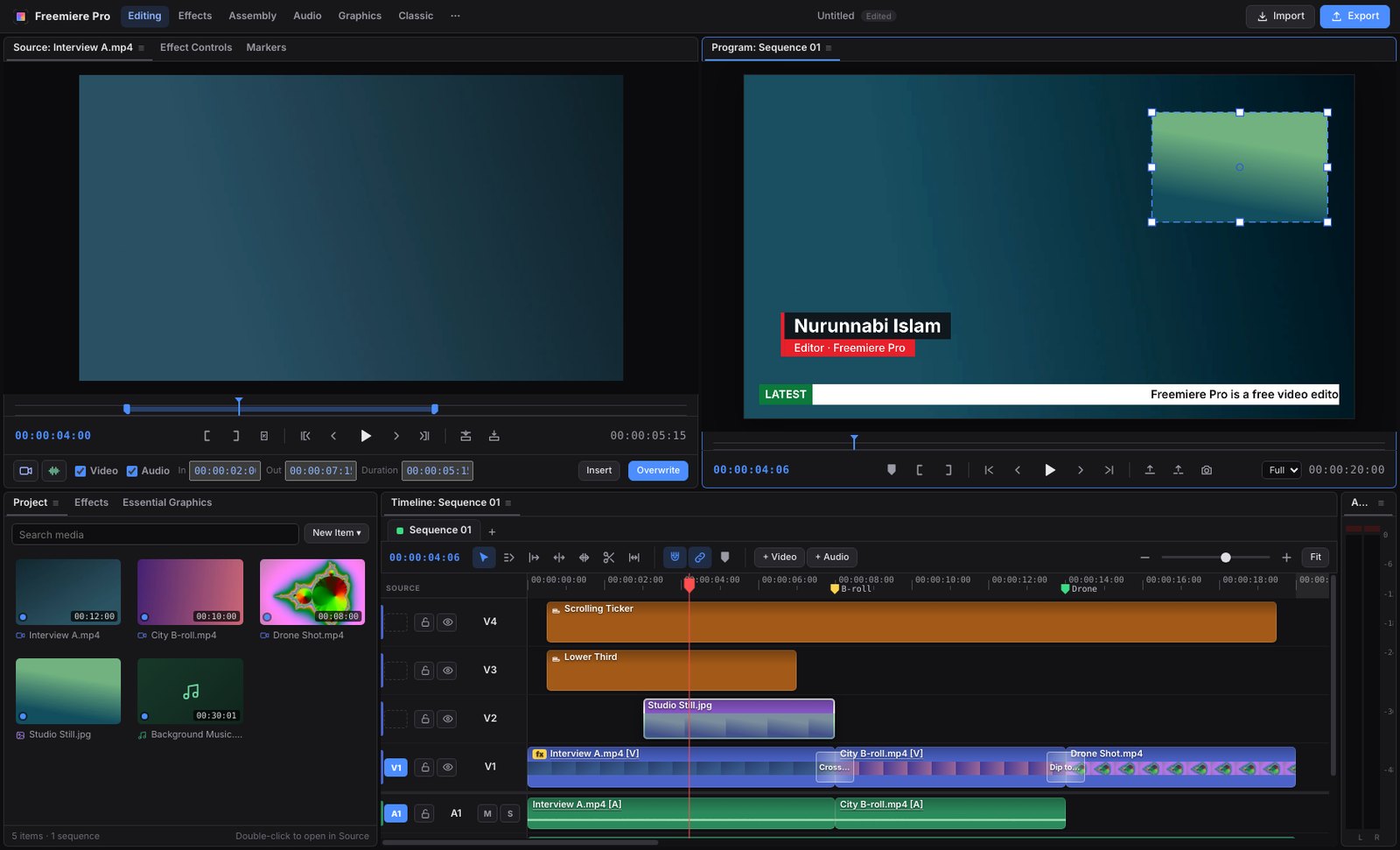
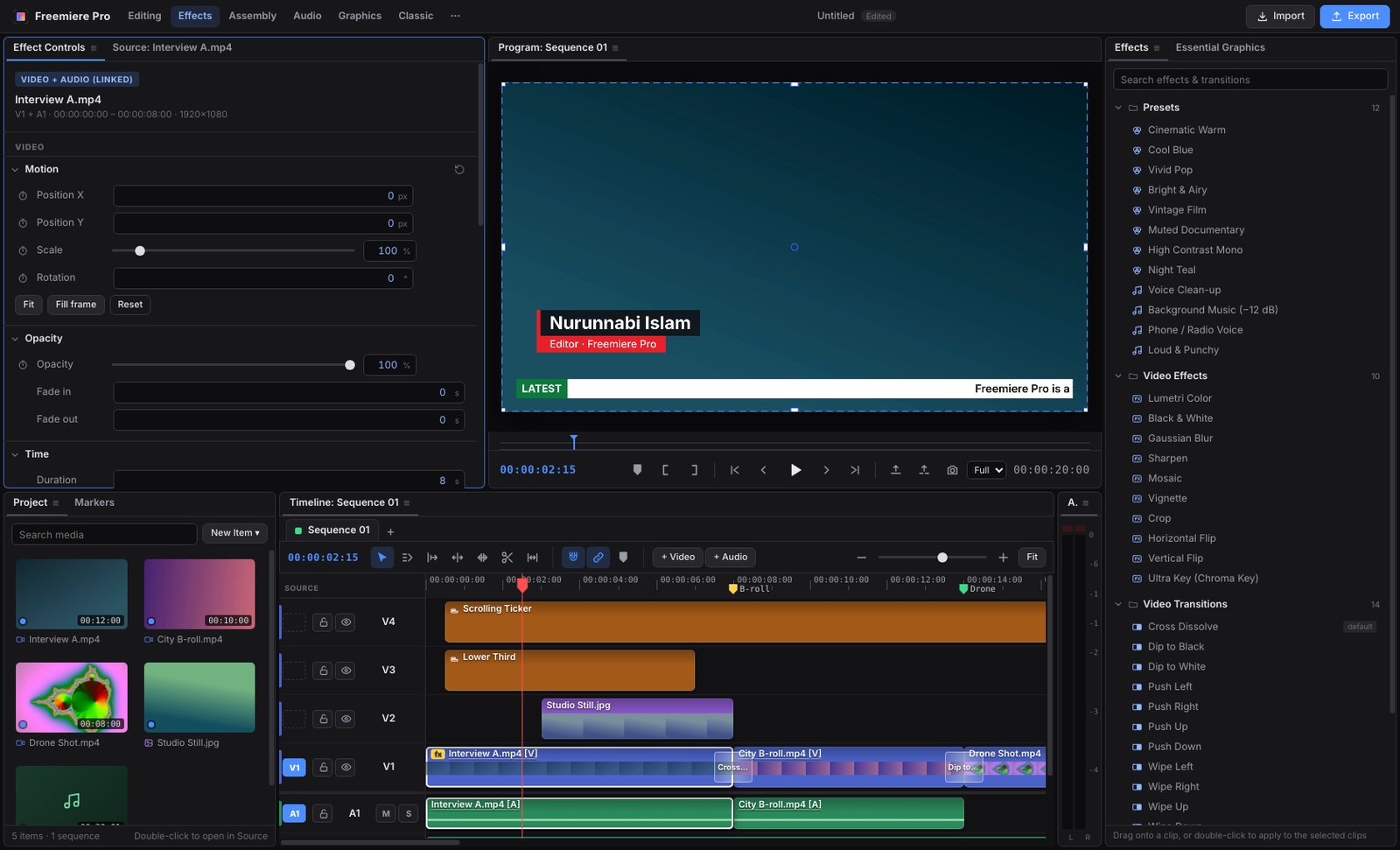
Dockable panels and workspaces. Project, Source, Program, Effect Controls, Timeline, Audio Meters and the other panels can be dragged anywhere, grouped, or floated as their own windows. The Editing, Effects, Assembly, Audio, Graphics and Classic workspaces each remember their layout.
A real Source monitor. Set In and Out with I and O, take video only, audio only or both, and send the clip to the timeline with Insert (,) or Overwrite (.). Source patching decides which tracks it lands on.
Timeline and tools. Multiple sequences, unlimited tracks, and the Selection, Ripple, Rolling, Rate Stretch, Razor and Slip tools. Video and its sound are placed as linked clips that move and cut together, and a red badge shows how many frames a pair has drifted out of sync. Undo goes 200 steps deep.
Keyboard shortcuts follow industry conventions, so muscle memory built here carries over to any professional editor.
Colour, effects and graphics
- Colour correction: exposure, contrast, temperature, tint and saturation, with eight ready-made looks.
- Effects: Black & White, Gaussian Blur, Sharpen, Mosaic, Vignette, Crop and Ultra Key for green screen. Most effects accept ellipse or rectangle masks, for example to blur a face or a number plate.
- Keyframes: animate Position, Scale, Rotation, Opacity, Volume and Pan with linear, ease or hold interpolation.
- Transitions: Cross Dissolve, Dip to Black/White, Push, Wipe, Iris, Clock Wipe and Cross Zoom.
- Broadcast graphics: News Headline Bar, Scrolling Ticker, Lower Third, Breaking News, Live Bug and Caption Box templates. Bangla and other complex scripts render correctly, which matters a great deal for Bangla content creators.
Audio and export
Audio offers volume up to 400%, pan, EQ, a compressor and noise reduction, plus presets such as Voice Clean-up and Background Music. Export is H.264 MP4 at any size: 1080p, 4K, 9:16 for Reels, square or 4:5. Preview and export share one rendering model, so what you see in the editor is exactly what ends up in the file.
Coming next
Version 2.5 adds Remove Silence (cutting the pauses out of talking clips in one step), multi-camera editing, speed ramps, nested sequences, Auto Reframe, auto-save, and faster hardware export with HEVC and ProRes.
Download
Freemiere Pro is free and open source under the MIT licence. It runs on macOS 11 or later, with separate installers for Apple silicon (M1–M4) and Intel Macs. Download the latest release from GitHub. Found a bug or have an idea? Let me know on GitHub.
Freemiere Pro is an independent project and is not affiliated with Adobe.