SRM Recorder: A Free Mac Screen Recorder with System Audio

· 2 min read
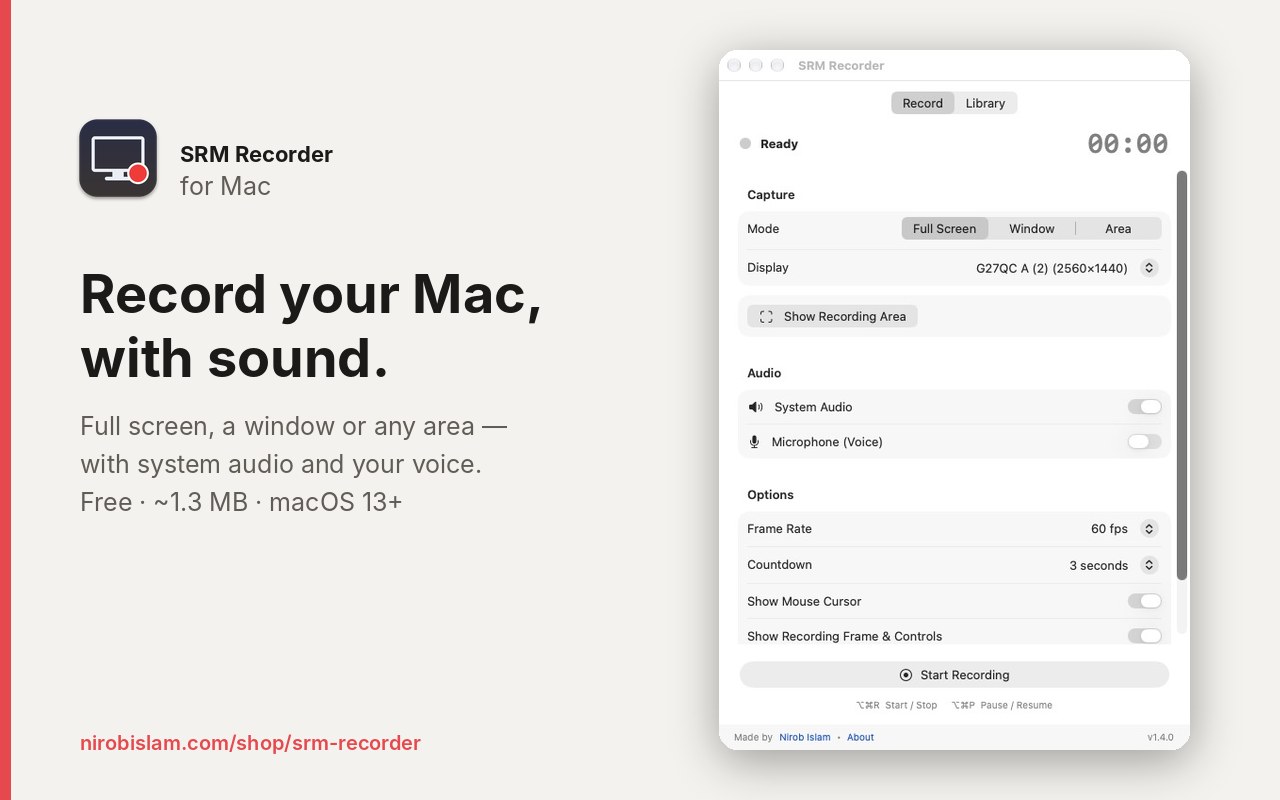
The Mac can already record the screen, but not the sound it plays. Record a tutorial, a video call or a game and the file comes out silent unless you install an audio driver. SRM Recorder fixes that. SRM Recorder for Mac is a small native app that records the screen together with the Mac's own sound, and your voice through a microphone if you want it.
Record exactly what you need
- Full screen: any display, including a second monitor.
- One window: only that window is recorded, even if something else moves in front of it.
- Any area: drag a rectangle over the part of the screen you want.
Before you start, Show Recording Area draws a red frame around exactly what will be recorded. During recording the frame stays on screen, with a small bar next to it showing the timer, Pause and Stop. Neither appears in the video. The frame turns orange while you are paused.
Sound: the Mac's, yours, or both
System Audio and Microphone are two separate switches. Turn either one on or off. You can choose which microphone to use, and a level meter shows that your voice is being picked up. When both are on, they are mixed into one audio track, so the file plays correctly everywhere, from YouTube to VLC to your phone.
Made for everyday use
- Pause and Resume: the paused part is simply cut out of the video.
- Countdown: 3, 5 or 10 seconds to get ready.
- Shortcuts that work in any app:
⌥⌘Rstarts and stops,⌥⌘Ppauses and resumes. - Menu bar: a live timer and all the controls, even with the main window hidden.
- Quality settings: MP4 or MOV, H.264 or HEVC, 24, 30 or 60 fps, Retina or 1x resolution, and cursor on or off.
- Library: every recording with a thumbnail, its length and size. Play, rename, show in Finder or move to Trash from there.
Small, native, and it updates itself
The download is about 1.3 MB. Everything it needs is already part of macOS, so there are no drivers or extra software to install, and it runs on both Apple silicon and Intel Macs. When a new version comes out, the app tells you and installs it with one click. Your Screen Recording permission stays in place after each update.
Download
SRM Recorder is free. It needs macOS 13 (Ventura) or later. Download the DMG from the shop page or the releases page, open it and drag the app into Applications.
The first time you open it, right-click the app and choose Open. On macOS 15 and later, use System Settings → Privacy & Security → Open Anyway. Then allow Screen Recording when macOS asks and click Quit & Reopen in the app.
SRM Recorder was previously called “Screen Recorder”. It is the same app; copies installed earlier rename themselves when they update.
Found a bug or have an idea? Email me at nirob@nirobislam.com.